Overview
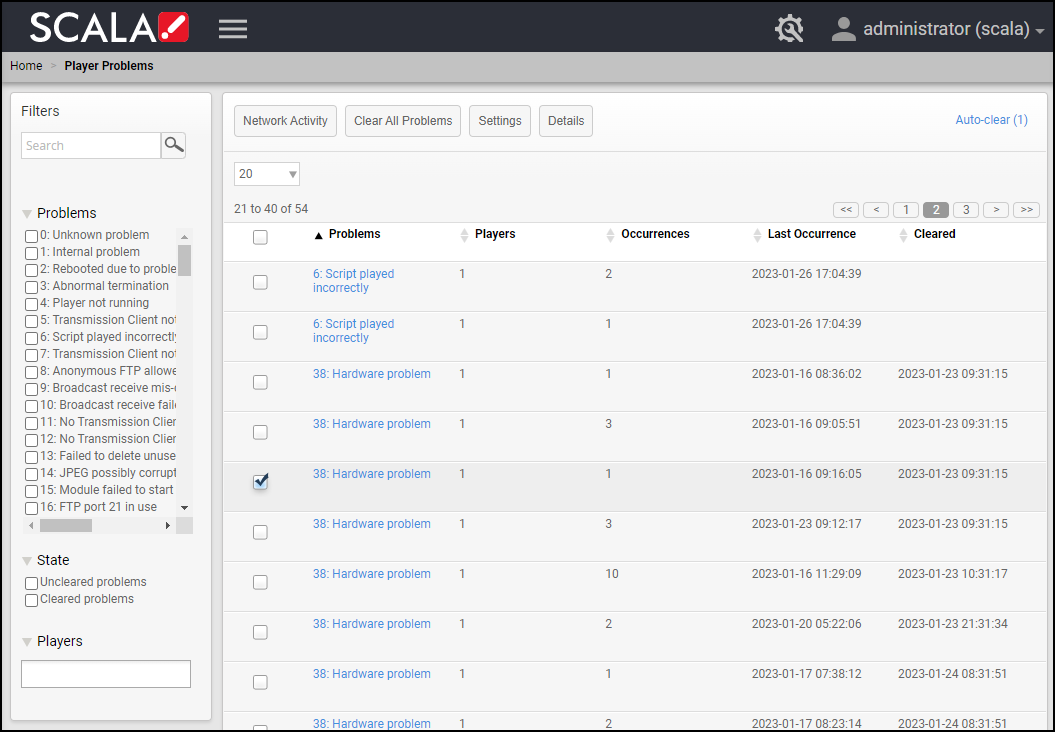
Use the Player Problems page to view a list of errors reported by network players to Content Manager. From this page, you can see error codes, clear problems, and view network activity for players.
The Player Problems page was previously called the Player Health page in older versions of Content Manager.
Opening the Player Problems Page
Follow the steps below to open the Player Problems page.
Click the main menu
 .
In the menu, select Player Problems. The Player Problems page opens.
To quickly view the uncleared problems for one or more specific players, go to the Players list, select the checkbox next to the desired player(s), then click the Health button at the top of the Players list. The Player Problems page opens with the necessary filters applied so that only the uncleared problems for the selected player(s) are displayed.
Viewing the Latest Network Activity
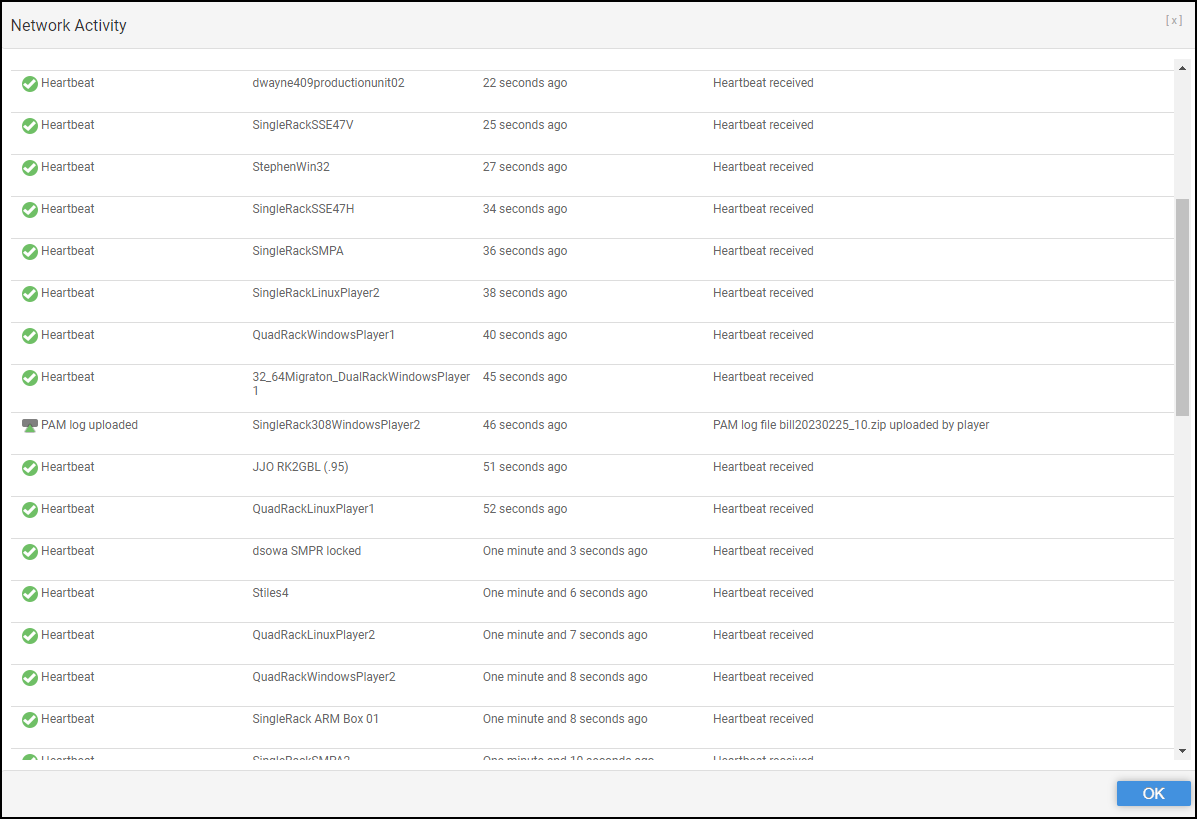
To review the latest network activity across your Scala Enterprise environment, such as heartbeats and other communications, click the Network Activity button.
Player Problems Settings
The errors on the Player Problems page can be in either a cleared state or an uncleared state. Cleared errors are generally those that you already reviewed and are therefore no longer a priority. However, you can still view cleared problems as needed; the filter options on the Player Problems page control whether cleared, uncleared, or both types of errors appear on the page.
To change the settings related to automatically clearing and deleting older errors:
Open the Player Problems page.
Select the Settings button, located above the error list. The Player Problems Settings window opens.
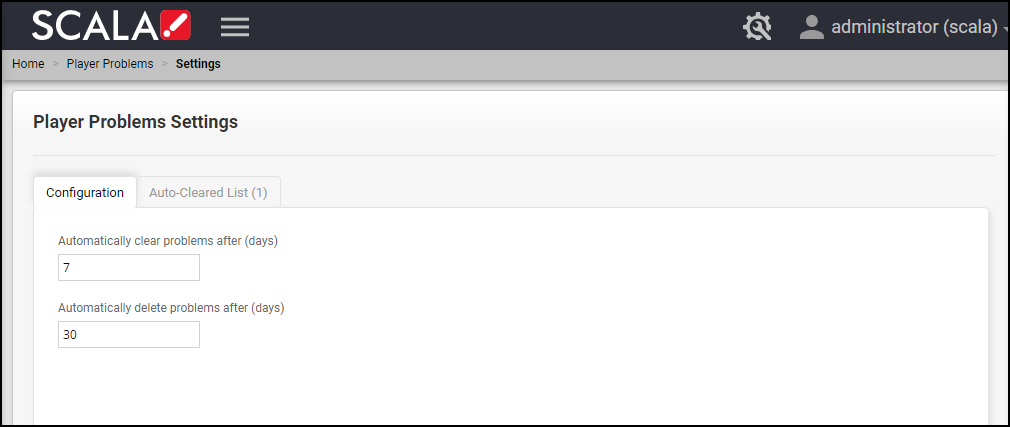
The settings on the Configuration page are used to prevent an excessive number of outdated error messages from accumulating on the Player Problems page. The settings are:
Automatically clear problems after (days) - Enter the number of days (1 - 360) after an error occurs that it is automatically changed from uncleared status to cleared status. You can still view errors that are in a cleared state.
Automatically delete problems after (days) - Enter the number of days (1 - 360) after an error occurs that it is automatically deleted. The number entered here must be greater than the Automatically clear problems after setting.
Select the Auto-Cleared List tab. If you want certain types of errors to be automatically cleared whenever they occur, click the Add button, select the desired error(s) to be automatically cleared, then click the Add & Close button. Typically, you should set errors to auto-clear if they are of very little concern or they are a nuisance.
Click the Save Changes or Save & Close button.
Error Codes
Use the following tables to better understand the error codes that may appear on the Player Problems page. Error codes also appear in player logs (which are accessible on the Logs page of player profiles).
Scala Error Codes
The following table describes Scala software error codes. The information provided in the table may help you better understand and troubleshoot the error.
Code # | Error Text | Summary | Description |
|---|---|---|---|
0 | Unknown problem | Unknown problem. | No specific problem code was available. |
1 | Internal problem | Internal problem. Software is not functioning properly. Rebooting is suggested. Please contact Scala Technical Support. | Indicates there is an internal problem in the software. |
2 | Rebooted due to problem | Software was rebooted due to an unhandled failure. Please contact Scala Technical Support. | An internal problem in the software led to a reboot. |
3 | Abnormal termination | <ProductName> terminated abnormally. This may indicate that the software failed to start, or encountered a driver error or other condition that caused it to fail. The Windows application logs, or Dr. Watson logs may contain more details. | The watchdog detected that the application terminated unexpectedly and restarted. |
4 | Player not running | This <ProductName> is not displaying, because the Playback Module is not running. It may have failed to start or someone may have manually closed it. Playback will not resume automatically, and some intervention, like a Reboot command, is needed to resume playback. | Player graphics engine fails to start up. |
5 | Transmission Client not running | This <ProductName> cannot be contacted by Scala Content Manager, because the Transmission Client Module is not running. It may have failed to start or be misconfigured. | Player network engine fails to start up. |
6 | Script played incorrectly | Script "<ScriptName>" played incorrectly. | Indicates a general error playing back a script, including the failure to find Linked Content. (Where warranted, certain specific errors will have their own problem codes.) |
7 | Transmission Client not Admin | Some features, including Install System File and Install Software Update, may not work because Administrator-level account privileges are required. | Player transmission client detects some features may not work because administrative privileges are required. |
8 | Anonymous FTP allowed | There is a security hazard: the FTP server is configured to allow anonymous login. | An FTP server is detected that allows anonymous log in. |
9 | Broadcast receive mis-configured | Broadcast transmissions cannot be received because of a configuration problem. | Receive Book reports an error with the configuration that will prevent the receive book from getting broadcast transmissions. |
10 | Broadcast receive failed | A broadcast job was not received because of insufficient resources. Note that it is possible, although unlikely, that the broadcast job will be received on a future attempt. | Receive Book reports an error getting a broadcast transmission due to lack of resources, most likely lack of disk space. |
11 | No Transmission Client tray icon yet | The Transmission Client Module does not yet have a tray icon, because it is having trouble creating one. This problem is only a delay and will be reported again if it persists. | Player transmission client is having trouble creating its tray icon. |
12 | No Transmission Client tray icon | The Transmission Client Module does not have a tray icon, because it failed to create one after repeated attempts. | Player transmission client gives up on creating its tray icon. |
13 | Failed to delete unused content | Some disk space could not be re-used, because the <ProductName> failed to delete some files associated with old content that previously was discarded. | Player health reporting subsystem has given up sending heartbeat information. |
14 | JPEG possibly corrupt | The image "<FileName>" may not display correctly because it is corrupt or invalid. | The JPEG library encounters a file that seems to be corrupt or malformed. |
15 | Module failed to start | Scripts may play incorrectly because the <ModuleName> Module cannot be started. If applicable, please verify any hardware for the <ModuleName> Module, or verify the <ModuleName>> Module settings in the <ProductName> Configuration. | A Module has a problem starting. This will most likely occur when the Module cannot obtain the necessary resources (i.e. the serial port). |
16 | FTP port 21 in use | The <ProductName> cannot receive jobs, because the internal FTP server could not be started. The most likely cause of this problem is that a third-party FTP server is already running on this system. Recommend disabling the third-party FTP server or reconfiguring the <ProductName> to receive jobs via the third-party FTP server. | Player transmission client cannot start the integrated FTP server because the port is already in use, and the FTP server is started on the default port. Note there is a different problem (and problem wording) if the an attempt is made to start the integrated FTP server on a non-standard port. |
17 | FTP port in use | The <ProductName> cannot receive jobs, because the internal FTP server could not be started. The most likely cause of this problem is that another server product is already using port <PortNumber>. Recommend reconfiguring the <ProductName> to use a different port. | Player transmission client cannot start the integrated FTP server because the port is already in use, and the FTP server is started on the default port. Note there is a different problem (and problem wording) if the an attempt is made to start the integrated FTP server on a non-standard port. Note that the only way to configure the Player transmission client to use a different port is via MMOS.ini variables, so only advanced users should ever see this problem. |
18 | FTP server failed to start | The <ProductName> cannot receive jobs, because the internal FTP server could not be started. | Player transmission client cannot start the integrated FTP server. |
19 | FTP server rejected command | The FTP server received an unexpected command. This could be a result of a coding error in the Scala Transmission Server Module, but possibly indicates that someone has discovered the <ProductName>s password, has connected to it with an FTP client, and is attempting to gain access to files and folders on the system. | Player transmission client receives an invalid FTP command. The consequence could be that an internal coding problem has resulted in an invalid command being sent, or it could indicate a security breach, the consequence of which the administrator must interpret. |
20 | FTP server rejected password | An FTP client has been temporarily blocked, because the password was not accepted. This problem might occur if the FTP server's password has been changed recently, or if someone has manually entered the password incorrectly. It also might occur if the computer is not behind a firewall and an attempt is being made to break into a Scala Network. | The integrated FTP server blocks a client because the client has tried to connect multiple times using a password that was not accepted. This means someone or some software is trying to connect using a known Scala Network login name. |
21 | FTP server rejected password again | An FTP client has been temporarily blocked, because the password was not accepted. This problem might occur if the FTP server's password has been changed recently, or if someone has manually entered the password incorrectly. It also might occur if the computer is not behind a firewall and an attempt is being made to break into a Scala Network. | The integrated FTP server blocks a client because the client has tried to connect multiple times using a password that was not accepted. This means someone or some software is trying to connect using a known Scala Network login name. |
22 | FTP server rejected username | An FTP client has been temporarily blocked, because the username was not accepted. This problem might occur if someone has manually entered the username incorrectly, but in most cases it occurs if the computer is not behind a firewall and an attempt is being made to break into FTP servers on the network. | The integrated FTP server blocks a client because the client has tried to connect multiple times using a username that was not accepted. This means someone or some software is trying to connect using an unknown Scala Network login name (e.g., anonymous) |
23 | FTP server rejected username again | An FTP client has been temporarily blocked, because the username was not accepted. This problem might occur if someone has manually entered the username incorrectly, but in most cases it occurs if the computer is not behind a firewall and an attempt is being made to break into FTP servers on the network. | The integrated FTP server blocks a client because the client has tried to connect multiple times using a username that was not accepted. This means someone or some software is trying to connect using an unknown Scala Network login name (e.g., anonymous) |
24 | Too many errors | Some of the errors logged by this <ProductName> in the last 24 hours will not be viewable in the Scala Content Manager Health Monitoring view because a very large number of unique errors have been reported. This is unusual, and may indicate that an unexpected error condition has occurred. This should be reported to Scala Technical Support. | Player health subsystem has detected that more than N unique errors have occurred in a 24 hour period, and therefore some error messages were not reported. |
25 | Text not displayed | Some text elements in the script will not be displayed. | Fonts subsystem fails to install an embedded font. |
26 | Script failed to publish | Script "<ScriptName>" was not published. | Publish Automation EX Module logs that a specific script could not be published. The publish operation may continue with the next script on the list, if any. |
27 | Scripts failed to publish | Scripts could not be published, because the publish operation encountered a fatal error. | Publish Automation EX Module reports if a fatal error prevents publishing of more than one script. This may include problems with the common target for a list of scripts. |
28 | Script published with errors | Published script "<ScriptName>" will contain errors such as missing files. A user override switch instructs us to publish such scripts. | The Publish Automation EX Module logs that a specific script was published containing errors such as missing files. |
29 | Publish Automation failed to start | Content-producing servers may not be able to publish to the Scala Network, because the Scala Publish Automation EX Module is not running. It may have failed to start or someone may have manually closed it. The process will not resume automatically, and some intervention, like a Reboot of the host computer, is needed to resume functionality. | Publish Automation EX Module logs it failed to start up. |
30 | No Publish Automation tray icon yet | The Scala Publish Automation EX Module does not yet have a tray icon, because it is having trouble creating one. This problem is only a delay and will be reported again if it persists. | Publish Automation EX Module logs it is having trouble creating the tray icon. |
31 | No Publish Automation tray icon | The Scala Publish Automation EX Module does not have a tray icon, because it failed to create one after repeated attempts. | Publish Automation EX Module application logs that it has given up creating the tray icon. |
32 | Failed to resume download | An attempt to resume download of a file over <HTTP/FTP> has failed. This is not necessarily a critical problem as in many cases another attempt will be made to download the file. If this error occurs repeatedly it may indicate a problem that requires attention. For example, it may indicate unreliable network connectivity, which can result in files taking longer than expected to download. | The script file-transfer subsystem attempts to resume a file download, and fails. This subsystem does not know the purpose of the file being downloaded so this problem cannot describe all possible consequences, and the file may be downloaded again on a later attempt. |
33 | Resume download succeeded | Resume download of a file over <HTTP/FTP> has succeeded. The original error is included in this problem report. The presence of this error is not necessarily a critical problem, however if this error occurs repeatedly it may indicate a problem that requires attention. For example, it may indicate unreliable network connectivity, which can result in files taking longer than expected to download. | The script file-transfer subsystem attempts to resume a file download, and succeeds. In this case the original error is logged for tracking, but generally is not a cause for concern. |
34 | Failed to resume upload | An attempt to resume upload of a file over <HTTP/FTP> has failed. This is not necessarily a critical problem as in many cases another attempt will be made to download the file. If this error occurs repeatedly it may indicate a problem that requires attention. For example, it may indicate unreliable network connectivity, which can result in files taking longer than expected to upload. | The script file-transfer subsystem attempts to resume a file upload, and fails. This subsystem does not know the purpose of the file being uploaded so this problem cannot describe all possible consequences, and the file may be uploaded again on a later attempt. |
35 | Resume upload succeeded | Resume upload of a file over <HTTP/FTP> has succeeded. The original error is included in this problem report. The presence of this error is not necessarily a critical problem, however if this error occurs repeatedly it may indicate a problem that requires attention. For example, it may indicate unreliable network connectivity, which can result in files taking longer than expected to upload. | The script file-transfer subsystem attempts to resume a file upload, and succeeds. In this case the original error is logged for tracking, but generally is not a cause for concern. |
36 | Font not installed | The script will play incorrectly because a font required by the script is not installed. | The text drawing engine cannot open a font. |
37 | Dialing limits exceeded | Networking connectivity costs may be higher then expected because of excess dialup activity. | User configurable dialing limits have been exceeded. |
38 | Hardware problem | A significant hardware problem was detected. | A hardware problem is detected. |
39 | Thumbnail not generated | A thumbnail was not generated. | Thumbnail generator feature of the Server Support module fails to make a thumbnail. |
40 | Thumbnail has missing elements | A thumbnail was generated, but with some elements missing. | Thumbnail generator feature of the Server Support module makes a thumbnail, but some elements could not be drawn. |
41 | Contents File format unknown | When downloading a script, an existing Contents File with an unknown or unsupported format was encountered. The existing file has been replaced. No action is required. | The script transfer subsystem finds an unknown format file where there should be an existing "contents file" (an XML file that describes the script layout and contents.) |
42 | Playback report not uploaded (retrying) | A billing file for this <ProductName> was not properly prepared for transmission. Another attempt will be made at a later date. No action is required. | A single billing log is not properly prepared for upload (copied to temp directory and compressed), and that single file will not be uploaded. Processing of the rest of the files will continue. |
43 | Playback reports not yet uploaded (retrying) | One or more billing file(s) for this <ProductName> will not be available because an error occurred while uploading the file(s). Another attempt will be made again later. | A recoverable error uploading the billing logs happens and we will retry the upload. |
44 | Cleanup problem | When uploading billing files, an error occurred cleaning up old files. The cleanup will be completed at a later time. No action is required. | There is a problem cleaning up old temp files, but the upload of the billing logs will not be impacted (processing will continue.) |
45 | Playback reports cannot be uploaded | One or more billing file(s) for this <ProductName> will not be available because an error occurred while uploading the file(s). | A non-recoverable error happened while uploading the billing logs, and as a result, processing will stop. |
46 | IP Multicast receive error | IP Multicast data cannot be received because an error occurred while initializing the network stack. The driver will retry again automatically but if this problem persists rebooting the player may correct the problem. | IP multicast pipe cannot receive broadcasts. |
47 | Placeholder problem | No description provided, place holder text. | Internal use during Scala software development, and normally does not occur in the actual product. |
48 | No Transmission Server tray icon yet | The Transmission Server does not yet have a tray icon, because it is having trouble creating one. This problem is only a delay and will be reported again if it persists. | Transmission server is having trouble creating the tray icon. |
49 | No Transmission Server tray icon | The Transmission Server does not have a tray icon, because it failed to create one after repeated attempts. | Transmission server gives up creating the tray icon. |
50 | Player not currently running | Information only: The <ProductName> was not playing at the time of processing a new plan, as the Playback Module could not be contacted. There are windows of time during startup and shutdown when this can happen normally, in which case playback will resume shortly, and no action is required. This alone is therefore not considered alarming. Expect a separate alarmable problem around this time if the problem requires manual action. | Player graphics engine fails to start. |
51 | Cannot receive plans | The Scala Player Transmission Client cannot receive new plans, because the folder does not exist. | Player network engine cannot receive plans because the folder does not exist. |
52 | Cannot download plans | The Scala Player Transmission Client may not have the latest plan, because it is having trouble downloading it. This problem is only a delay and will be reported again if it persists. | Player network engine cannot receive plans because the folder does not exist. |
53 | Plan unreadable | The Scala Player Transmission Client may not have the latest plan, because the plan file is corrupt or incomplete. This problem is not necessarily serious, and may resolve itself on a future retry. | Player network engine cannot receive plans because the folder does not exist. |
54 | Cannot upload plan status | The player network cannot return plan status, because it is having trouble uploading it. This problem is not necessarily serious, and may resolve itself on a future retry, however it can result in incorrect or out dated status information on the server. | Player network engine cannot return plan status. |
55 | Failed to remove preloaded content | The player network cannot remove unneeded preloaded content, because it is having trouble deleting it. This problem is not necessarily serious, however it can result in wasted CPU time in the future as the unneeded content may be checked again. | Player network engine cannot remove obsolete pre-installed content. |
56 | Maintenance job failed | The player network failed to execute a maintenance job, because of an error. No future attempts will be made. | Player network engine reports when a maintenance job fails. |
57 | Maintenance job failed (retrying) | The player network failed an attempt to execute a maintenance job, because of an error. The job will be retried and may succeed on a future attempt. | Player network engine reports when a maintenance job fails, but will be retried. |
58 | Maintenance job waiting for files | The player network failed to execute a maintenance job, because some files required for installation are not available yet. A future attempt will be made at the next scheduled execution time. | Player network engine reports when a maintenance job fails because some required files are missing. |
59 | Transmission Server missing files | The transmission server failed to broadcast a file, because the file is not available. This may indicate a problem with the source file server or the file may have been replaced by a newer revision. | Network transmission engine cannot broadcast a file because the file does not exist on the file server. |
60 | Transmission Server broadcast failed | The transmission server failed to prepare the a broadcast, because an unexpected error occurred. This problem can result in players not receiving needed files or plans. | Network transmission engine fails to build a broadcast package. |
61 | Transmission server message failure | The transmission server failed to process a message, because an unexpected error occurred. This problem may automatically resolve itself on a retry, however it indicates an unexpected condition that should be investigated by technical support. | Network transmission engine fails to process a received message. |
62 | Player Invalid license | The <ProductName> is not playing content, because the Playback Module does not have a valid license. | Player engine cannot play scripts because it does not have a valid license. |
63 | Failed cleaning up health logs | When uploading health logs, an error occurred cleaning up old files. The cleanup will be completed at a later time. No action is required. | There is a problem cleaning up old temporary files, but the upload of the Health logs will not be impacted (processing will continue.) |
64 | Health logs cannot be uploaded | One or more health log(s) for this <ProductName> will not be available because an error occurred while uploading the file(s). | A non-recoverable error happened while uploading the health logs. Processing of health logs will stop. |
65 | Health logs not uploaded (retrying) | One or more health log(s) for this <ProductName> will not be available because an error occurred while uploading the file(s). Another attempt will be made again later. | A recoverable error uploading the Health logs happens, and the upload will be retried. |
66 | Heartbeat not delivered | Heartbeat could not be delivered. A heartbeat is a status report that players periodically deliver to Content Manager so that you can monitor that your players are up and running. | Player health subsystem discovers it can not deliver the heartbeat to the server. It is NOT alertable, as it is not recommended to cause another heartbeat when a heartbeat can not be delivered. |
67 | Failed to register Scala Maintenance | The Scala Player Transmission Client failed while trying to register the Scala Maintenance expiration date. This is not a serious problem, however it may may result in some incorrect prompts when attempting to install a service pack on this player. The most likely cause of this problem is the Scala Network Transmission Client is not running under an administrator account. | Player network engine cannot register a license. |
68 | Configuration problem | Configuration Problem. Software is not functioning properly. Please check your configuration and/or contact Scala Technical Support. | A configuration problem not covered by a more specific problem. |
69 | Product not authorized | Product authorization failed, because the product hardware key is not installed or was not detected. This problem will result in a product not operating. Check that hardware key is plugged in, and that the key driver has been installed. | An error occurred while authorizing a product. |
70 | Product license invalid | Product authorization failed because the product license is not valid. This problem will result in a product not operating. Check that a valid license file has been purchased and installed correctly. | An error occurred while authorizing a product. |
71 | Transmission Server broadcast send failed | The transmission server failed to send a broadcast package or envelope to a broadcast server. This problem can result in players not receiving needed files or plans. | Network transmission engine fails to push a broadcast package or envelope to a broadcast server. |
72 | Download failed | Download of file failed. This problem may correct itself on a future attempt. | File download failure. The file transfer engine normally retries when appropriate. |
73 | Upload failed | Upload of file failed. This problem may correct itself on a future attempt. | File upload failure. The file transfer engine normally retries when appropriate. |
74 | Problem reading transitions | Some scripts may play incorrectly because of errors reading the transition definitions. | Problem when reading the transition-definition files. |
75 | Render monitor problem | The Render Monitor will not work correctly because of an error. | Render Monitor fails. |
76 | Server Support service not running | Thumbnails for media and messages may not be updated, because the Scala Server Support module failed to start. | Some intervention, such as a reboot of the host computer, may be needed to resume functionality. This problem is reported when the Server Support module of Content Manager fails to start up. |
77 | No Server Support tray icon yet | The Scala Server Support engine does not yet have a tray icon, because it is having trouble creating one. This problem is only a delay and will be reported again if it persists. | The Server Support service is having trouble creating the tray icon. |
78 | No Server Support tray icon | The Scala Server Support engine does not have a tray icon, because it failed to create one after repeated attempts. | The Server Support service gives up creating the tray icon. |
79 | No players defined | It appears that there are no players defined for this network. You must create and configure players in Scala Content Manager before refreshing the player list in <ProductName>. | If the redirect.xml file is not found, then there are no players defined in the Content Manager. |
80 | Player Config Invalid license | The Playback Configuration Module cannot determine playback options, because the Playback Module does not have a valid license. | Player configuration engine cannot determine playback capabilities because the player has an invalid license. |
81 | Broadcast failed | Broadcast failed. Player plans and content files embedded in the broadcast may not have be received. | A broadcast failed. |
82 | Broadcast send envelope failed | Broadcast send envelope failed. Player plans and content files embedded in the broadcast will not have be received. This problem may resolve itself on a future attempt, but until resolved the broadcast data cannot be transmitted. | Broadcast send envelope failed (applies to package drivers only). |
83 | Broadcast confirmation failed | Broadcast confirmation failed. Player plans and content files embedded in the broadcast may not have be received. This problem may resolve itself on a future attempt, but until resolved the broadcast reception state of the players cannot be determined. | Broadcast confirmation failed. |
84 | Broadcast Server plan download failed | The Scala Broadcast Server may not have the latest plan, because it is having trouble downloading it. This problem is only a delay and will be reported again if it persists. | Broadcast server cannot receive plans because the folder does not exist or a connection issue occurs. |
85 | Broadcast Server plan status upload failed | The Broadcast Server cannot return plan status, because it is having trouble uploading it. This problem is not necessarily serious, and may resolve itself on a future retry, however it can result in incorrect or out dated status information on the server. | Broadcast server cannot return plan status. |
86 | Broadcast Server failed to abort | The Broadcast Server cannot abort orphaned broadcast. This problem is not necessarily serious, and may resolve itself on a future retry, however it can result in active broadcasts being delayed. | Broadcast server cannot abort orphaned broadcasts. |
87 | No Broadcast Servers defined | It appears that there are no broadcast servers defined for this network. You must create and configure broadcast servers in Scala Content Manager before refreshing the broadcast server list in <ProductName>. | If the broadcast-redirect.xml file is not found, then there are no broadcast servers defined at the Content Manager. |
88 | Logging failed (disk space below reserve) | Player could not write log entries to IC.log because the remaining free space on the partition is below the disk space reserve level. Remove files to increase the free space on the disk. | Player detected that it is running out of disk space, so it will not log entries until more space is freed. |
89 | Media download failed (disk space below reserve) | Player is not playing the current plan because there is insufficient disk space available to download required media (the remaining free space on the partition is below the reserve level.) Remove files to increase the free space on the disk so that media may be downloaded. | Player will not store newly downloaded media because there is not enough free disk space. The content playing will be out of date. |
90 | Playback audit logging failed (disk space below reserve) | Player could not write log entries to the Playback Audit Log because the remaining free space on the partition is below the disk space reserve level. Remove files to increase the free space on the disk. | Player detected that it is running out of disk space, so it will not playback audit log entries until more space is freed. |
91 | Transmission Client detected UAC | Some features, including Install System File and Install Software Update, will not work because Windows User Account Control (UAC) is enabled. UAC is not suitable for a remotely managed Player. | Windows User Account Control (UAC) should be disabled on Player PCs because there is no user present. If it is enabled, remote software updates will fail because there is no user to ask permission from. Player would have to be updated by an operator using a conventional installer, instead of via the remote maintenance capability of Content Manager and Player. |
92 | Screen problem during playback | Playback is active but some media items may not have displayed due to issues with the screen. | An issue with the screen is preventing a media item from being displayed. |
93 | Player failed to finish media item (watchdog) | Watchdog detected that Player failed to complete playing the current media item when expected, and may need to be rebooted. Please contact Technical Support if this problem persists. | The watchdog detected that Player failed to complete playing the current media item when expected, and may need to be rebooted. |
94 | Cannot embed font | The published ScalaScript contains a font that cannot be embedded. To successfully distribute this script, ensure that the target machines already have the necessary font(s) installed. | The ScalaScript contains a font that cannot be embedded. Please make sure that the target machines have the necessary font(s) installed. |
95 | Media file missing, download failed | A media item is missing at the source and could not be downloaded. This might be the item itself or a ScalaScript missing a referenced file. Re-uploading the file or re-publishing the ScalaScript is suggested. | A media item is missing from the source and could not be downloaded. This problem may be solved by re-uploading the file or publishing the ScalaScript. |
96 | Media item did not play | Media item <itemname> did not play. | A media item did not play. |
External Error Codes
Your Scala environment may be integrated with other devices or services, using Windows Scripting (Python, VBScript, etc.), or external applications that interact via COM. These integrations can report problems via the Scala problem reporting system.
The following problem codes are defined for problems or warnings of various types. The custom integration can supply its <modulename> and a <custom message> to display in the logs and in Content Manager's Player Health screens.
Code # | Error Text | Description | Explanation |
|---|---|---|---|
1000 | External problem | The module "<ModuleName>" reported a problem: "<custom message>". | Error noted by the custom integration software not better described by a more specific code. |
1001 | External warning | The module "<ModuleName>" reported a problem: "<custom message>". | Warning noted by the custom integration software not better described by a more specific code. |
1002 | External hardware problem | The module "<ModuleName>" reported a problem: "<custom message>". | Error related to the Player hardware monitored or managed by the custom integration software. |
1003 | External hardware warning | The module "<ModuleName>" reported a problem: "<custom message>". | Warning related to the Player hardware monitored or managed by the custom integration software. |
1004 | External display problem | The module "<ModuleName>" reported a problem with the Display or Screen: "<custom message>". | Error related to the display or screen monitored or managed by the custom integration software. |
1005 | External display warning | The module "<ModuleName>" reported a warning with the Display or Screen: "<custom message>". | Warning related to the display or screen monitored or managed by the custom integration software. |
1006 | External device problem | The module "<ModuleName>" reported a Device problem: "<custom message>". | Error related to a device used or managed by the custom integration software. |
1007 | External device warning | The module "<ModuleName>" reported a Device warning: "<custom message>". | Warning related to a device used or managed by the custom integration software. |
1008 | External communication problem | The module "<ModuleName>" reported a Communications problem: "<custom message>". | Error related to communication (e.g. network connection) used by the custom integration software. |
1009 | External communication warning | The module "<ModuleName>" reported a Communications warning: "<custom message>". | Warning related to communication (e.g. network connection) used by the custom integration software. |
1010 | External software problem | The module "<ModuleName>" reported a Software problem: "<custom message>". | Error related to the custom integration software itself. |
1011 | External software warning | The module "<ModuleName>" reported a Software warning: "<custom message>". | Warning related to the custom integration software itself. |
1012 | External data problem | The module "<ModuleName>" reported a Data problem: "<custom message>". | Error related to the data used by the custom integration. |
1013 | External data warning | The module "<ModuleName>" reported a Data warning: "<custom message>". | Warning related to the data used by the custom integration. |